
NOTE: It may take several hours from when you register an account to getting the email to verify your account. This is controlled by the server host, not me. You may also have to wait several hours if you update/change your password.
To register on the Copperstone Community Forum, follow these steps:
1. Go to https://www.copperstonecommunity.org/copperstone-community-forum/
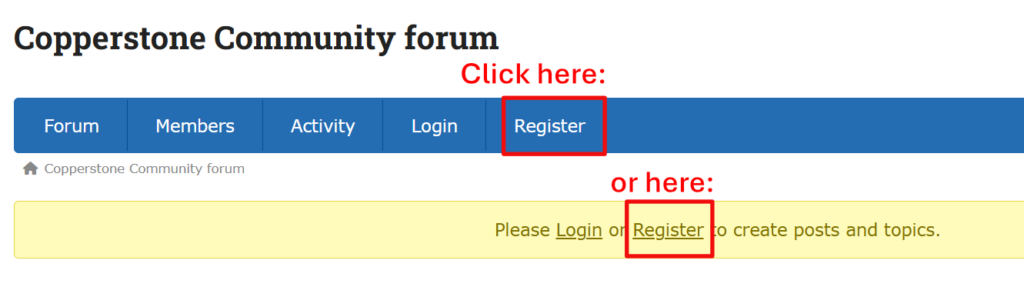
2. Click on the Register button
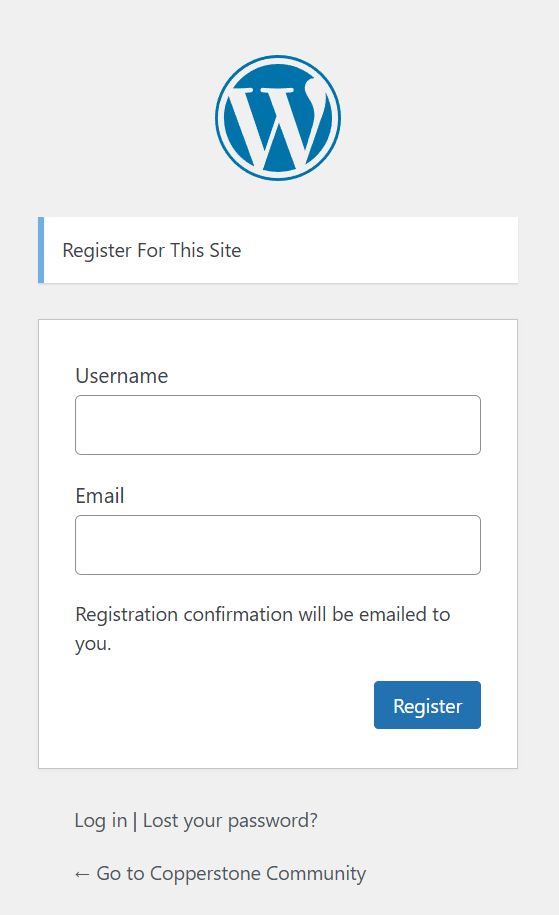
3. Enter a Username and Password, then click Register.
NOTE: If you already have a WordPress account, you can use that instead.
4. You will be emailed to verify your account. Click the link in the email to confirm your account (this email may take several hours to arrive–this is a server host issue).
5. You will now have Guest access to the forum. To be able to post and see all subforums, you must email admin@copperstonecommunity.org and include the following information:
– Subject line of email: Account approval request
– Your account name for this forum
– Your actual/real name
– Your unit or strata lot number
– If you are an owner or tenant (renter)
When I receive this information, I’ll change your account status from Guest to Owner/Tenant and you will then be able to view all forums, create new topics and reply to posts.
You can verify your status by clicking the Profile button on the main forum page and checking the usergroup you are listed under.
I understand you may be reluctant to provide this information. I can promise that your information will never be shared with any organization or anyone else, and is only to help identify you as a legitimate user on this forum. Your information, including email address, will never be sold to third parties or used for any other purpose except to identify you for this forum.
If you do not send the above information, your account will remain as Guest.